
Installation Guide#
中文版本:安装指南
Prepare the environment#
V2 requires Python >= 3.11 and Torch >= 2.6. Create an environment, then use the PyTorch installation selector to install Torch, torchvision and torchaudio for your target device:
uv venv --python 3.11
source .venv/bin/activate
This guide uses uv for environments and installation. Install matching Torch,
torchvision and torchaudio with the official commands so missing companion
packages do not cause the installer to select another Torch. After installing
SJ, use uv pip check to check dependency consistency.
This guide follows the development source. PyPI installs contain released changes only; use the corresponding documentation for older versions. Minimum requirements do not mean every version and device has been verified. Tested environments include Torch 2.7.1 and GPU environments with Torch 2.11.0+cu128 / Triton 3.6.0.
V2 uses PEP 440 compatible semantic version numbers. The earlier 0.0.0.0.X
scheme is historical: odd X denoted development versions and even X
denoted stable PyPI releases.
Choose an installation#
CPU execution needs neither Triton nor native CUDA. NVIDIA CUDA users can install Triton, build native extensions manually, or prepare both. Triton stays optional and is not added by a regular installation. For ordinary GPU neurons, start with compatible Triton. Consider native builds for fused projections or when measurements show a benefit in eager execution.
An existing Triton matching Torch and meeting SJ's minimum version needs no
additional installation or upgrade. Check its version with
uv run --no-sync python -c "import triton; print(triton.__version__)";
successful import does not verify every kernel or compilation profile. Install
the extra when missing.

Both accelerators can coexist; modules need no backend configuration.#
Install |
Command |
|---|---|
PyPI release |
|
PyPI pre-release |
|
Optional Triton |
|
Latest development source |
|
For the development source with Triton:
uv pip install "spikingjelly[triton] @ git+https://github.com/fangwei123456/spikingjelly.git"
Source is also available from OpenI.
Developers with a source checkout can use uv pip install --editable ".[triton]".
Installation maps the root ops/ directory to spikingjelly._ops; setting
PYTHONPATH alone does not replace installation. See CONTRIBUTING.md in
the repository for development conventions.
Build native CUDA manually#
Regular wheels contain no precompiled native libraries. Manual source builds are currently recommended, normally downloading the PyPI sdist and compiling locally without a Git checkout. The following command requires the V2 release containing these operators to be published on PyPI; older releases cannot build the current operators through this command.
Prepare CUDA-enabled Torch, a matching CUDA Toolkit with nvcc, and a C++
compiler. Set CUDA_HOME if the toolkit is outside the default location.
Builds without a visible GPU must set TORCH_CUDA_ARCH_LIST to the actual
target architectures.
uv pip install "setuptools>=77.0.3" ninja
SJ_BUILD_NATIVE_CUDA=1 uv pip install \
  --no-build-isolation --no-binary spikingjelly \
  --reinstall-package spikingjelly --no-cache "spikingjelly>=2.0.0"
After a successful build, check the default eager binding in a new process on an available target NVIDIA GPU:
uv run --no-sync python -c \
  'import torch; from spikingjelly.activation_based import functional; print(functional.neuron_implementation("lif", torch.device("cuda:0")))'
A compatible native extension should report implementation: cuda. If it
reports triton or torch, check the native loading reason in
unavailable. The query does not run a neuron; profiles such as state
precision still affect individual calls. See the full checks below.
Option |
Effect |
|---|---|
|
Require native extension compilation for this source build; it is disabled by default. |
|
Download the SpikingJelly sdist; other dependencies can still use wheels. |
|
Use the current environment's Torch and build dependencies. The default isolated environment does not include the Torch needed for this build. |
|
Reinstall SpikingJelly even if it is already installed. |
|
Avoid reusing a previously built wheel after build settings change. |
This command does not add optional Triton; install spikingjelly[triton]
separately if needed. An explicit build request fails immediately if CUDA-enabled
Torch, the CUDA Toolkit, a compiler or required architecture settings are missing.
Compilation failures also fail installation. Without the environment variable,
builds remain pure Python. This check only runs during source builds; installing
an existing wheel or retaining an existing installation does not run it.
Reinstallation and disabling the cache remain necessary because --no-binary
can still reuse uv's cached wheels.
If PyPI downloads are unavailable or you need development source, obtain an OpenI checkout and use the same manual build:
git clone https://git.openi.org.cn/OpenI/spikingjelly.git
cd spikingjelly
uv pip install "setuptools>=77.0.3" ninja
SJ_BUILD_NATIVE_CUDA=1 uv pip install --no-build-isolation .
A GitHub checkout works too. uv rebuilds and reinstalls local directories
explicitly passed on the command line, so the sdist's --no-binary and related
options are unnecessary. Changes to .cu or headers in an editable install
require another native build; they do not take effect like Python source changes.
Runtime only loads native binaries, without invoking a compiler. The current loader checks the operator ABI, complete Torch version, CUDA version and target GPU support; environment changes may require rebuilding. Triton retains its own first-use JIT and caching. Not every platform's CUDA Torch includes usable Triton.
Execution after installation#
Move modules and inputs to the same device. Ordinary registered neurons follow the selection below. CUDA checks candidates on first use for each device and execution path, then reuses the binding without online benchmarking.
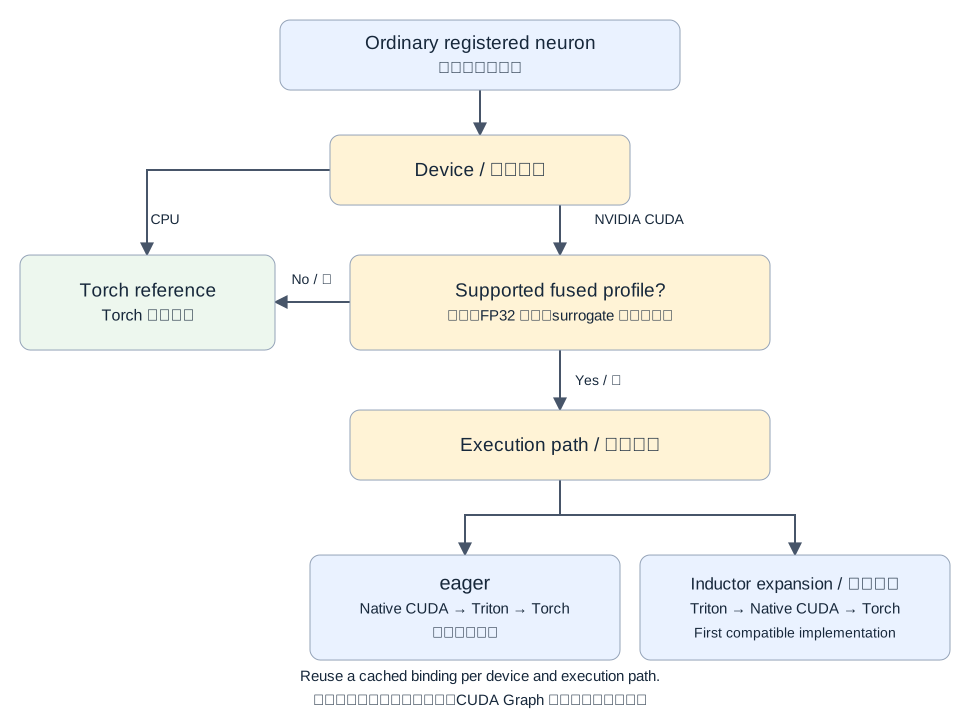
CUDA arrows show candidate order. CUDA Graphs retain the captured function's selection.#
Installing an implementation does not mean every call uses it:
Feature |
Requirements |
|---|---|
Ordinary registered neurons |
Supported inputs, FP32 state and built-in surrogates can use fused execution. Ordinary module state follows input dtype; low-precision state or custom surrogates can use Torch reference equations. |
Explicit IF/LIF/PLIF precision |
Requires CUDA Triton supporting the requested combination; other implementations cannot replace an explicitly requested numerical policy. |
FlexSN CUDA multi-step |
Supported cores use Triton; known unsupported combinations can use Torch/HOP. Single-step execution uses Torch. |
Fused IF/LIF-Linear and packed/sparse projections |
Compatible native extensions use the corresponding kernels; missing extensions use Torch reference execution. Triton does not provide these native fused projections' performance properties. |
See Training and Inference Precision for input, state and recurrence precision; Automatic neuron execution for execution and compilation examples; and FlexSN for custom dynamics.
Check the installation#
First check the installation path and CUDA Torch:
import torch
import spikingjelly

print(spikingjelly.__file__)
print(torch.__version__, torch.version.cuda, torch.cuda.is_available())
With an available NVIDIA GPU, query ordinary neuron bindings:
from spikingjelly.activation_based import functional

device = torch.device("cuda:0")
print(functional.neuron_implementation("lif", device, execution="eager"))
print(functional.neuron_implementation("lif", device, execution="compile"))
A query initializes selection without computing neuron outputs or advancing
state. implementation reports the binding; unavailable explains why
earlier candidates were unavailable. Profiles such as low-precision state may
still use reference execution. Missing dependencies and known incompatibility
allow checking the next candidate; unknown JIT, kernel, OOM and gradient errors
are reported. Logging is silent by default; see Automatic neuron execution for
logging and strict diagnostic environment variables. Restart after changing
dependencies, extensions or configuration.
Other optional dependencies#
Feature |
Command |
|---|---|
|
|
Lightning integration |
|
Transformer Engine precision features |
|
See the repository's pyproject.toml for other extras and version constraints.
The current package has no CuPy dependency; see Migrate from old versions for
retired installation options.